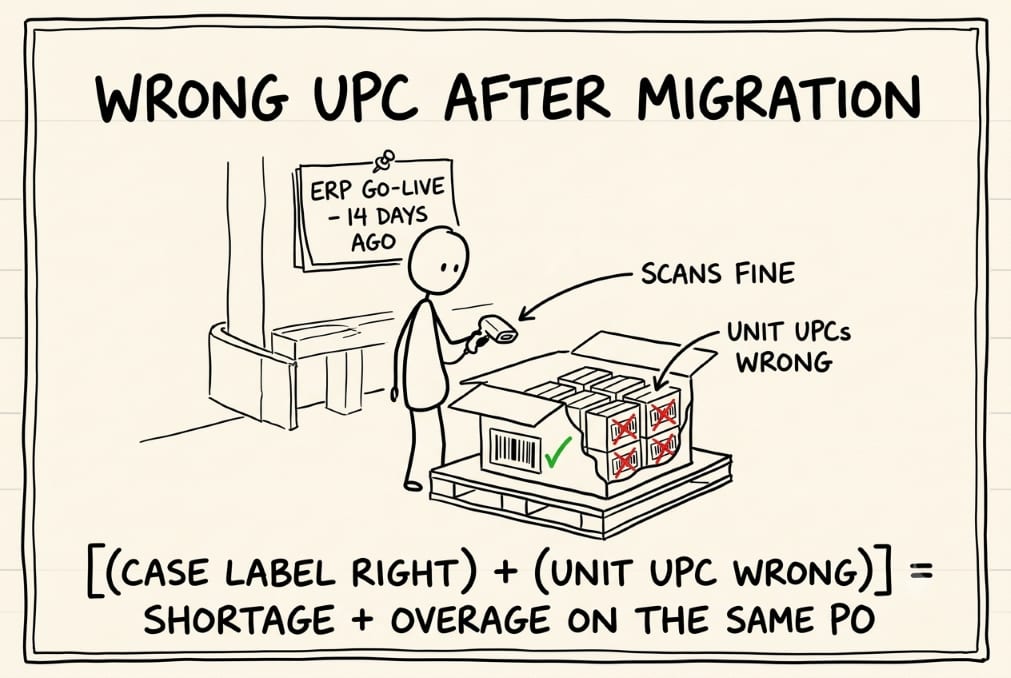
After an ERP migration, your cases can ship with the correct case label but the wrong unit-level UPC. Amazon's fulfillment center scans the unit. If the scan resolves to a different item than your ASN declared, Amazon posts a shortage on your ASIN and an overage on the mystery item. The remittance signature: a matched shortage and overage on the same PO.
Based on Oracle NetSuite's own help documentation (UPC Code field, item aliases, GTIN 01 identifier), Microsoft Learn's Business Central item-reference documentation, public GS1 and Amazon barcode-requirement guidance, and a pattern that supplier operators have described publicly on r/VendorCentral (linked in the piece). September 2026.
You run IT, finance, or operations for a CPG supplier that just went live on a new ERP. NetSuite, Business Central, or SAP Business One. Cutover weekend was clean. UAT passed on every test PO. Two weeks later, the first Amazon remittance lands and a shortage claim shows up on a PO you know shipped complete.
You pull the pick ticket. Complete. You pull the BOL. Complete. You call the warehouse. Nothing left short.
You open the shortage detail in Vendor Central and something else is on the same PO. An unexpected-item overage for the same case count, on an ASIN your team does not recognize. The math ties out. The units invoiced match the units received. Amazon’s system says the wrong product arrived.
By the time you pull a second PO, and a third, and the pattern is the same on every shipment since go-live, the number attached is measured in POs, not dollars. A supplier writing about this on r/VendorCentral described more than $100,000 of POs affected before catching the pattern, with the ERP migration two weeks prior. That is the exposure window a broken item-master field opens up before a deduction points back to it.
This article covers what actually broke, why cutover UAT did not catch it, and the one saved search that catches it at pallet scan.
The failure surface is smaller than it looks. One field on the item master, mapped to the wrong unit of measure during migration. The units on your dock are correct. The labels on the units are correct. The item master says something different about what those labels mean. Amazon trusts the item master.
Why cutover UAT reads clean
UAT for an ERP cutover verifies the flows. A PO downloads. A sales order posts. A shipment posts. An ASN transmits. An invoice bills. The test data seeded into the new system is built the week of cutover, using UPCs pulled from the new item master itself. Every test scans to the item it was built from. Every test passes.
Nothing in a standard UAT script compares a physical label on stock produced under the old system against what the new item master says the label should scan to. That comparison lives in a different place. It is a physical audit of inventory against a database, not a workflow test. Vendors of UAT tooling do not ship a canned test for it.
The failure only shows up when Amazon scans a real unit produced pre-cutover against the new master’s expectation of what the label should resolve to. By the time the first deduction lands, the shipment is 30 days past your dock. Amazon has already recalled or written off the affected inventory. The same pattern is repeating on every PO carrying the same SKU.
This is a specific version of the wider pattern covered in why your ERP says shipped and the retailer says short. The ERP transaction posted. The retailer’s receiving system saw something different.
Where the UPC lives in your item master
The field that fails is not always called UPC. Where it lives depends on the ERP and on how the previous system was configured. The failure itself is one thing: a mismatch between what the physical label carries and what the item master says the label should be.
In Oracle NetSuite, the primary barcode value goes into the UPC Code field on the item record. That field is the default on transactions and receipts. Additional barcodes get added after item creation as text, capped at 32 characters. If your item ships in multiple units of measure and needs a distinct barcode per unit, the item aliases table stores each one. NetSuite maps only the GTIN 01 identifier back to the parent item automatically. A GS1 GTIN-14 goes in as an alias.
In Microsoft Dynamics 365 Business Central, the field is an item reference. Older builds still call it a cross-reference. Each item reference is configured per vendor, customer, or barcode, and tied to a specific unit of measure or variant.
That last point is where migrations break. If your product ships as an each with one barcode and as a case with a different barcode, you need two item references on the same item. Each has to point to its own unit of measure. A migration that carries the case-level reference over under the each unit of measure, or the reverse, produces exactly the failure this article describes. The Business Central specifics for the wider ASN pattern are covered in Business Central EDI failures, and the NetSuite equivalent is in NetSuite EDI 856 failures.
The cleanest way to check your own migration is to open one SKU that ships to Amazon and list every barcode on the physical inventory in your warehouse today. Confirm each one resolves back to the same internal item at the correct unit of measure. If it does not, that SKU is queued to produce this deduction on its next shipment.
What Amazon’s fulfillment center actually scans
Amazon’s fulfillment center scans at the unit level, not just at the case. Public GS1 and Amazon barcode guidance is explicit that each sellable unit needs its own unique GTIN. Only one scannable barcode per unit is permitted. If the case master pack scans to ASIN A and the individual bottles inside scan to ASIN B, the FC honors the unit scan. Your expected ASIN records as short. The unrecognized ASIN records as an unexpected-item overage.
The mechanic rests on two facts. The item on your invoice is what your EDI 856 ASN declared would arrive. The item Amazon records is what the unit scan resolved to. When the physical label was minted under the old UPC assignment and the new item master expects a different one, those two disagree. The receipt books against the wrong item.
This is a specific version of the Amazon ASN Accuracy chargeback unit-count-mismatch sub-type, plus a companion shortage claim in parallel. One shipment, two hits, matched.
The remittance signature: shortage and overage on the same PO
A physical shortage shows up as one line. Units expected, units received short, gap billed back. That is the pattern in the standard Amazon shortage-claim workflow, and in every Walmart code 22 shortage where the DC signed for fewer cases than the invoice billed. If you are reading a Walmart remittance for the first time, read a Walmart remittance advice walks through where each line lives.
The UPC-migration failure looks different. The goods physically arrived intact. The scan booked them against the wrong catalog item. The result is a shortage line for your expected ASIN at the full quantity, plus an unexpected-item overage line for the same quantity on a different ASIN.
Pull five deducted POs from the two weeks after your cutover. If the paired pattern shows up on every one, you are not looking at five separate warehouse mistakes. You are looking at one item-master field that broke at migration.
The overage line is what makes this failure diagnosable from the remittance alone. A physical shortage would not produce a matching overage. A UPC migration does. Once you can see the pair, tracing back to the specific item-master field takes an afternoon. The full document chain from PO to invoice to remittance is walked through in EDI 810: how a mismatch becomes a deduction. The UPC failure lands inside that chain at the item-master step.
The pre-transmission check most teams skip
The validation that would have caught this at cutover is not a UAT script. It is a comparison between the new item master’s scannable barcode fields and the physical labels on pre-cutover inventory. If you know which SKUs have pre-cutover stock in the warehouse, pull a sample carton of each. Scan one unit-level barcode. Confirm the scan resolves to the same internal item at the correct unit of measure. Any mismatch is a queued deduction on the next shipment carrying that SKU.
Post-cutover, run the same check at pallet scan. Before the pallet leaves the dock, a warehouse worker scans a sample carton and a sample unit. The ERP looks up the scanned value against the item-reference or alias table. If the scan resolves to a different item than what the ASN is about to declare, the ASN generation blocks. The operator gets a message naming the SKU. NetSuite item aliases and Business Central item references both support this lookup natively. The Business Central mobile app supports the same lookup from a phone camera.
Bake the same check into the dispute pack you assemble for anything that slipped through. The retail deduction evidence pack covers the wider set of documents Amazon expects on a dispute. The check here fits inside the wider data-bridge audit that maps every place a quantity or identifier can drift between your ERP and the retailer’s receiving system.
When to run this check
Any ERP migration that touches the item master needs this check before go-live. NetSuite, Business Central, SAP Business One, and every mid-market platform store UPC and barcode data slightly differently. The migration mapping between the old and new schema is where the failure originates.
The pattern is not specific to Amazon 1P. Any retailer that scans at the unit level (Walmart’s advanced receiving, Costco’s DSD process, Target’s compliance program) can produce the same paired shortage-plus-overage signature on the remittance.
The dispute clock is short. Amazon gives you 30 days from the chargeback notification to file in Vendor Central. If the paired shortage-and-overage pattern is on five POs already, the fifth one is close to its dispute deadline. The next five are being packed under the same broken master.
Numbers, field names, and validation approaches in this piece reflect the sources linked inline. Your specific ERP configuration, unit-of-measure setup, and Amazon vendor terms are visible in Vendor Central and in your ERP’s item-record and item-alias screens. Check yours.
Frequently Asked Questions
- Why does a shortage claim show up when the shipment left complete?
- Amazon's fulfillment center scans at the unit level, not just the case. If the case label scans to the correct ASIN but the unit label inside scans to a different real ASIN, Amazon books zero receipt on your item and an unexpected receipt on the mystery item. The first is a shortage. The second is an overage. Both hit the same PO.
- Why did our cutover UAT pass without catching a wrong UPC?
- UAT test data is usually seeded with UPCs the test scripts already know are correct. Nothing in the test compares the new item master against physical labels on inventory produced under the old master. The mismatch only surfaces when Amazon scans real pre-cutover inventory against the new master's expectation of what the label should be.
- Which item-master field usually breaks in a NetSuite or Business Central migration?
- The field that stores the scannable identifier at the unit of measure Amazon actually receives. In NetSuite, that is the UPC Code on the item record or a GTIN in the item aliases table. In Business Central, that is an Item Reference of type Barcode tied to the correct unit of measure. A migration that maps the each-level UPC to the case-level record, or the reverse, ships product whose labels do not match the item master.
- How do I catch this at pallet scan instead of after the deduction lands?
- Before the pallet leaves the dock, scan one unit-level barcode. Look up the value in your ERP's item-reference or alias table. Compare the result against the item the ASN is about to declare for that PO. If they do not match, block the ASN. NetSuite item aliases and Business Central item references both support this lookup natively.
- How do I tell a UPC-migration failure apart from a real shortage?
- A physical shortage shows up as one line: units expected, units received short. A UPC-migration failure shows up as two lines on the same PO: a shortage line for your ASIN and an unexpected-item overage line for a different ASIN at the same case count. The matched pair is the signature.
Find out what your deductions are actually costing you.
A 30-minute call with the founder, who will tell you which of the three scans fits your problem, or that none of them do.