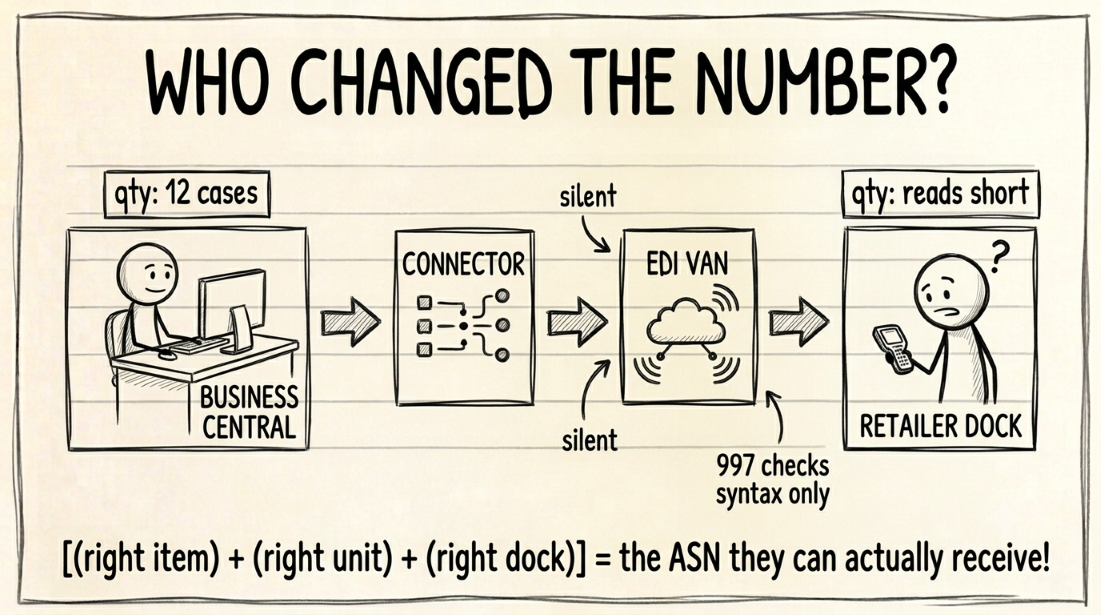
Business Central generates no X12 EDI on its own, so every retailer ASN passes through a connector reading BC records. Five gaps corrupt it before transmission: missing item references, a wrong Qty. per Unit of Measure, a trigger wired to the wrong warehouse posting step, an unmapped ship-to or GLN, and kits that never explode to pack level.
Based on Microsoft Learn documentation for Dynamics 365 Business Central covering item references, item units of measure, outbound warehouse flow, the Ship-to Address table, and assembly items, August 2026. Business Central's own fields and behavior are documented. Which validations a given EDI connector runs before transmission varies by vendor and is not a public standard.
You run supply chain, logistics, or finance at a CPG supplier doing $20M to $100M into Walmart, Target, or Amazon, and a shortage deduction just came off this month’s check. You pull the paperwork. The order shipped complete, the BOL matches the purchase order, and Business Central shows the sales order fully shipped and fully invoiced.
Your warehouse manager can’t tell you what went missing, because nothing did.
Somewhere between Business Central and the retailer’s receiving scan, a quantity changed.
The retailer’s system never saw a data error. It saw a shortage, and thirty to sixty days later that shortage came off a check.
Most months the dispute costs more in labor than it recovers, so you write it off — though the full cost of that manual reconciliation usually runs past the labor line alone — and the same gap fires again on the next order to the same DC.
Finding it is harder in Business Central than in most ERPs, for one structural reason. The number that reached the retailer passed through three systems after it left BC, and each one had a chance to change it.
Business Central generates no X12, so a connector always stands in between
Business Central does not produce retail EDI on its own. It ships with a Data Exchange Framework and native support for sending invoices in PEPPOL format.
PEPPOL is a European e-invoicing standard, not the ANSI X12 your retailer’s implementation guide specifies. Microsoft’s documentation is direct about the limit: supporting any other electronic document format means building a new data exchange definition.
Every supplier therefore runs a stack. Business Central holds the data, a connector or iPaaS layer maps it, a VAN or EDI provider wraps it in an X12 envelope, and the retailer’s system receives it.
That stack is normal and it works. The problem is diagnostic, not architectural. When a quantity is wrong at the receiving dock, the four hops all look healthy from their own side, and none of them raises an error, because each one faithfully passed on whatever the last one handed it.
Which system is responsible when a BC EDI shipment fails?
The fastest way to shorten a Business Central EDI investigation is to know, before you start, which hop owns the field you’re chasing and whether that hop tells you anything before the deduction arrives.
| Hop | Controls | Typical failure | Who fixes it | Warns you? |
|---|---|---|---|---|
| Business Central | Item master, units of measure, ship-to, posting timing | Stale field transmits as a valid wrong value | Your BC partner | No |
| Connector or iPaaS | Field mapping, kit explosion, trigger event | Right value, wrong X12 element | Connector vendor | Only in its own log |
| VAN or EDI provider | X12 envelope, qualifiers, transmission | Syntax and routing, not content | Your EDI provider | Yes, via the 997 |
| Retailer receiving | The scan, the receipt, the deduction | Valid document, wrong pallet | You, by dispute, after the fact | No |
Read the last column first. Only one of the four hops tells you something is wrong while you can still act on it, and the 997 functional acknowledgement only confirms syntax, never whether your numbers were right. A clean 997 on a wrong quantity is the most common false comfort in retail EDI.
The document that does report content-level problems is the 824 application advice, and most suppliers never wire it into anything. Reading the 824’s TED rejection codes is the closest thing to an early warning the chain offers. When neither document catches it, your remaining option is the dispute clock, and dispute windows vary by retailer.
The four failure modes below all originate in the first row, inside Business Central, which is the one row that never warns you.
Item references: the field that makes your item findable
A retailer identifies your item by its own number, usually a GTIN or a retailer-assigned SKU. Business Central stores that mapping on the item’s Item Reference Entries page rather than on the item card itself.
Reference entries are typed by customer, so the same physical item carries a different reference number for Walmart than for Target. Lanham Associates, whose EDI extension runs inside Business Central, calls cross-referencing the hardest part of EDI translation, because trading partners order the same item under numbers you don’t use internally.
Microsoft’s documentation notes something worth knowing before you audit yours. An item reference can carry a unit of measure and a variant code alongside the description, and all three copy onto the document line when the reference is selected.
A reference set up years ago with the wrong unit of measure attached will overwrite the line every time someone picks it.
The version that costs the most is not a blank reference. A blank one usually fails loudly, because the connector has nothing to send.
A stale reference pointing at a real GTIN from a discontinued SKU is the expensive case. It transmits cleanly, matches something valid in the retailer’s catalog, and produces an unmatched receipt against a PO that never listed that item.
Audit it with a filtered view of item reference entries for one customer. Check for entries against inactive items, and for references carrying a unit of measure you no longer sell in.
Qty. per Unit of Measure: where five pieces become 4.99998
Business Central’s item units of measure work off a base unit that must always have a Qty. per Unit of Measure of 1, with every alternate unit expressed as a multiple of it. Your case, pallet, and layer units all convert back through that field.
Microsoft’s own documentation walks through the arithmetic problem this creates. Receive a box of six, find one missing, adjust the receipt to five of six, and the conversion produces 4.99998 pieces rather than five.
Microsoft added a Quantity Rounding Precision field on the Item Units of Measure page specifically to round that back to a whole number.
For EDI the exposure runs in two directions. A fractional quantity is one the retailer’s receiving system has no way to book cleanly.
A whole quantity declared in the wrong unit is worse, because it looks legitimate. Declare a twelve-count case as twelve eaches and you report twelve times what you shipped.
That variance is a clean multiple rather than a random one, and the multiple is the tell. If your reported and received quantities differ by exactly the case-pack size, check the unit of measure on the line before you check the warehouse.
Posting timing: four warehouse methods, one connector trigger
Business Central offers four ways to pick and ship, set by the Require Pick and Require Shipment fields on the location card.
Method A posts pick and shipment straight from the order line. Method B posts both from an inventory pick, and Method C posts both from a warehouse shipment. Method D registers the pick on one document and posts the shipment on another.
Method D is where most ASN timing errors originate, because it separates two events the other three combine.
Microsoft’s documentation is explicit that a warehouse pick “can’t be posted and only registers the pick,” updating Qty. Picked on the warehouse shipment without reducing inventory or creating a posted shipment.
Wire your connector trigger to pick registration and your ASN reports quantities that packing has not yet confirmed.
Wire it to a lagging poll on posted shipments and the ASN can transmit after the truck arrives at the DC. Several retailers treat that as a compliance violation on its own, whether or not your quantities were correct. Amazon prices it as a standalone charge under ASN accuracy, and Walmart folds late delivery into the OTIF fine.
Trigger off the posted warehouse shipment, then set the connector poll interval short enough that the gap between posting and transmission cannot outrun the retailer’s arrival-based timing rule.
Confirm which of the four methods each of your locations actually uses before you assume one trigger covers all of them.
Ship-to address: the location code and GLN that route your shipment
Business Central’s Ship-to Address table carries three fields your EDI documents depend on and your order entry process rarely checks.
Location Code sets the default inventory location for shipments to that address. GLN is a 13-character Global Location Number identifying the physical site. Shipping Agent Code sets the carrier.
GLN is the field retailers actually use to identify a receiving DC on EDI documents. GS1, which administers the standard, defines the GLN as the identifier for a physical location such as a distribution center or a dock door, and the ship-from and ship-to GLNs are carried on the ASN itself.
Business Central gives GLN a dedicated column on every ship-to address, and leaving it blank pushes the job onto your connector’s mapping table.
The failure this produces looks like a routing problem and is actually a master-data problem. A ship-to record pointing at the wrong Location Code sends the shipment out of the wrong facility.
The receiving DC has no way to detect that from its own side of the transaction. You are the only party who can catch it.
Review ship-to addresses whenever a customer adds a DC, not only at EDI onboarding, and treat a blank GLN on an active retail ship-to as a defect rather than an optional field.
Assemble-to-order kits: one sales line, many cartons
A Business Central assembly item is one line on the sales order and one SKU in your item file. The retailer’s ASN expects pack-level detail: which item, in what quantity, in which carton.
That expectation is structural, not a retailer preference. The X12 856 nests data in a hierarchy of shipment, order, pack, and item levels, with the pack level carrying its own SSCC-18 in the MAN segment. A kit has to resolve into that hierarchy or it has nowhere to go.
The assembly BOM holds the component structure, and something has to explode it into pack-level lines before transmission.
Assemble-to-order adds a wrinkle the connector has to understand. Microsoft’s documentation notes that a single sales order line can carry both an inventory quantity and an assemble-to-order quantity, with assembly consumption and output posting automatically when the linked shipment posts.
Skip the explosion step and the ASN reports the kit as one identifier the retailer’s item file has never seen, or drops component detail entirely, leaving the receiving scan with cartons it cannot reconcile against anything you sent.
Confirm kit handling explicitly per assembly SKU per retailer rather than assuming a working simple-item mapping covers it, and re-test after any change to an assembly BOM’s component ratios.
The checklist, and where it stops
Five checks cover the Business Central side of the chain:
- Item references audited per customer for stale and mis-united entries
- Quantity Rounding Precision set on every alternate unit of measure
- Connector trigger confirmed against the actual warehouse method on each location
- Location Code and GLN populated on every active retail ship-to
- Kit explosion tested per assembly SKU per retailer
None of the five requires replacing a system, and none of them is caught by Business Central on its own.
What they will not cover is the three hops downstream. A correct value in Business Central can still be mapped into the wrong X12 element by the connector, and the responsibility table above exists because that division of ownership is where most investigations stall.
The same document-level failures show up regardless of ERP. That’s why the general 856 rejection reasons are worth reading alongside this, and why the NetSuite version of this checklist covers a different five gaps for a different item and fulfillment model.
Unfixed, these gaps arrive on your remittance with no Business Central fingerprint on them, which is its own reason to know how to read a remittance advice line by line.
A unit-of-measure mismatch or a pick-registration trigger reads exactly like Walmart deduction code 22, a billed quantity the DC never scanned.
A wrong Location Code or a late posted-shipment poll produces the same signature as Walmart deduction code 25, no receipt recorded against the invoice at all.
Mapping the full four-hop chain, rather than the BC row alone, is what the data-bridge assessment does at scope. The data-bridge calculator gives you a rough sense of what that gap is worth before you commit to finding it.
If your ERP says shipped and the retailer still deducted for shortage, the gap is usually between four quantities from four systems. The root-cause trace walks through where to look when the Business Central posted shipment says complete but the remittance says otherwise.
If a detail here doesn’t match how your Business Central instance or connector is configured, tell us and we’ll correct it.
Frequently Asked Questions
- Does Business Central handle EDI natively?
- No. Business Central ships with a Data Exchange Framework and support for PEPPOL electronic invoices, which is a European e-invoicing standard, not retail X12. For a Walmart or Target ASN you need a connector or middleware layer that reads Business Central records and translates them into X12. That translation layer is where most retail EDI configuration actually lives.
- Why does a unit-of-measure setting cause a shortage deduction?
- The Qty. per Unit of Measure field on an item's alternate unit tells Business Central how many base units a case contains. If your ASN declares eaches where the retailer's implementation guide expects cases, your reported quantity is off by exactly the case-pack multiplier. The receiving count then reads short or over, and a short read becomes a shortage deduction.
- When should the ASN transmit relative to Business Central's warehouse posting?
- After the pick is registered and the shipment is posted, not before. In an advanced warehouse configuration, a registered warehouse pick updates Qty. Picked but does not post the shipment, so an ASN fired at pick registration describes intended quantities rather than confirmed ones. Posting the warehouse shipment is the event that reflects what actually left.
- What is the GLN field on a Business Central ship-to address for?
- GLN is the Global Location Number, a 13-character GS1 identifier for a physical location. Retailers use it to identify the receiving DC on EDI documents. Business Central has a dedicated GLN field on the Ship-to Address table, and leaving it blank forces your connector to derive the DC identity some other way, usually from a mapping table maintained by hand and updated late when a retailer opens a new facility.
- Do I need to replace Business Central to fix these?
- No. All five gaps are configuration and validation problems inside records Business Central already has: the item card, item references, item units of measure, the ship-to address, and the assembly BOM. The work is deciding which check runs before transmission and where it runs, not changing systems.
Find out what your deductions are actually costing you.
A 30-minute call with the founder, who will tell you which of the three scans fits your problem, or that none of them do.