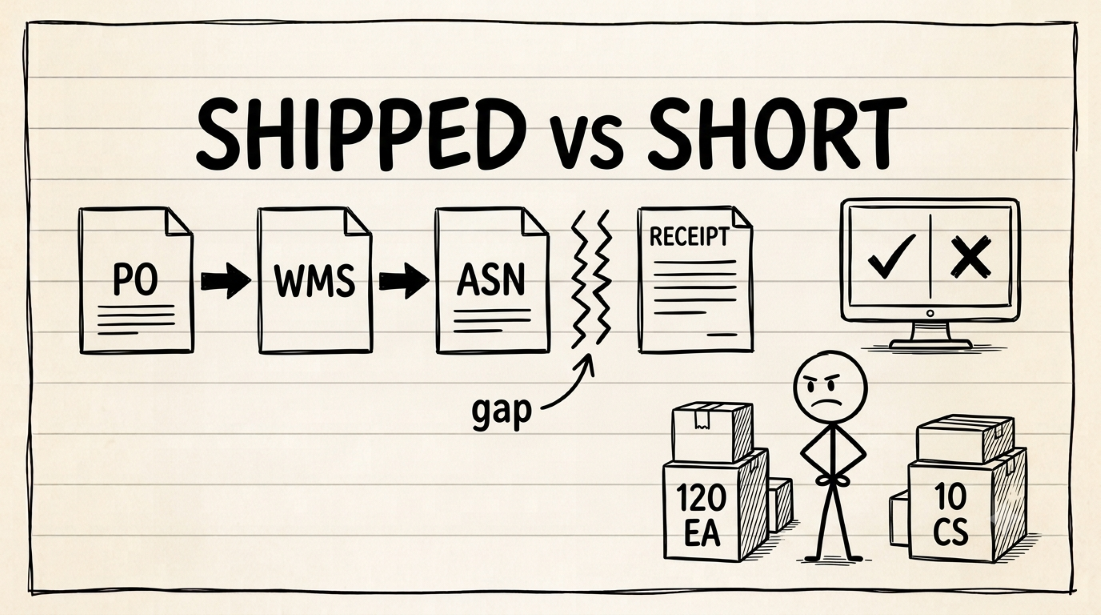
A shortage deduction usually comes from a mismatch between four numbers: ordered quantity (from the PO), picked quantity (from the WMS), ASN quantity (from the EDI 856), and received quantity (from the retailer portal). Your ERP may show shipped because the shipment was posted. That doesn't prove the retailer received the same units, cases, or cartons. It also doesn't prove the ASN matched the physical shipment. To fix the deduction, trace one SKU through the full chain and find the first place the numbers diverge.
Based on public documentation from Oracle NetSuite (item fulfillment, units of measure), Microsoft Learn (Business Central item references, warehouse posting, units of measure), SPS Commerce (EDI chargebacks), BOLD VAN (EDI mapping failures), Endless Commerce (shortage deduction benchmarks), and Confido (deduction recovery), September 2026. Individual ERP configurations and retailer receiving rules vary.
You run supply chain or finance for a CPG supplier on NetSuite or Business Central. A shortage deduction just landed on this month’s remittance. You pull up the ERP. The shipment screen says shipped in full. You check the pick ticket. The warehouse says complete. You forward both to Finance and say: dispute it.
Finance files the dispute. The retailer denies it. Your ERP screenshot wasn’t enough, because the retailer’s receiving system compared a different number against a different document, and found a gap you never checked.
Endless Commerce reports that 60 to 70% of shortage deductions either overstate the shortfall or trace back to receiving process failures. Confido puts the dispute win rate at 50 to 70% when the supplier files with complete documentation. The gap between those two numbers is what this article is about: the evidence your ERP doesn’t hold on its own.
What four numbers create one shortage deduction?
A shortage deduction looks like one problem. It’s four truths from four systems competing for the record.
| Quantity | Where it lives | What it answers |
|---|---|---|
| Ordered | Retailer PO, ERP sales order | What the retailer expected |
| Picked | WMS, 3PL, pick ticket | What the warehouse prepared |
| ASN’d | EDI 856 | What you told the retailer was coming |
| Received | Retailer portal | What the retailer counted at the dock |
Your ERP often owns only one of those four numbers. If your team treats the ERP as the whole truth, the dispute starts with one document and a hope. The retailer has three other documents that may disagree.
Does a posted shipment prove physical delivery?
A posted shipment means the ERP transaction moved forward. It doesn’t prove the truck carried that exact quantity.
These gaps show up regularly in growing brands:
- Pick exceptions posted after order release
- Split shipments not tied back to the original PO
- Substitutions entered outside the ERP (in a 3PL portal, for example)
- Short inventory allocated after the order was confirmed
- Manual ASN changes made outside the order record
- 3PL edits that your ERP connector doesn’t pull back
This is common in brands that added retailers faster than they added controls. If you’re running NetSuite, the Item Fulfillment record can carry a clean posted status while the ASN that your connector generated holds a different quantity. If you’re running Business Central, a warehouse pick that was registered but not posted sends intended quantities rather than confirmed ones.
UOM is where clean orders go to die
Shortage deductions routinely hide inside unit-of-measure setup. Your retailer ordered cases. Your ERP stored eaches. Your warehouse picked cartons. Your ASN transmitted packs. Your invoice billed cases. Each system used the right number inside its own walls. The chain still failed.
Check UOM across six places:
| System | What to verify |
|---|---|
| Item master | Base unit, case pack, inner pack |
| Retailer item setup | Retailer SKU, GTIN, pack size |
| PO import | Order unit and quantity |
| WMS | Pick unit and carton logic |
| ASN | Pack hierarchy and quantity |
| Invoice | Bill unit and price unit |
If one conversion is wrong, the shortage may be mathematical, not physical. Your ERP says 120 eaches shipped. The retailer expected 10 cases of 12 and received 10 cases of 12. The receiving count matches the physical shipment. But the ASN or invoice declared the wrong unit, and the retailer’s AP system recorded a mismatch.
In NetSuite, this traces to the Units of Measure list on the item record and the conversion your EDI connector uses. In Business Central, it traces to the Qty. per Unit of Measure field on the item’s alternate unit.
Can the ASN break even after the ERP is correct?
Your ERP may hold the correct shipment. The ASN can still leave wrong. That happens when mapping, timing, or transformation logic between your ERP and your EDI provider changes the message.
Common examples:
- ERP quantity is correct, but the ASN maps inner packs as cases
- Shipment posts today, but the ASN transmits tomorrow (outside the retailer’s window)
- The 3PL changes cartons after ASN generation
- The EDI provider transforms item identifiers using stale cross-references
- A split shipment creates one ASN against two physical loads
The retailer scores the ASN it receives, not your ERP screen. If those two documents don’t agree, the retailer’s version creates the deduction.
BOLD VAN reports that focused EDI mapping remediation produces a 50 to 80% reduction in chargeback volume within one to two quarters. Most of that reduction comes from fixing the same small set of mapping and timing errors.
Is the retailer’s receiving record always right?
Sometimes the retailer made the error. That’s why the evidence pack matters.
If the PO, pick ticket, ASN, BOL, POD, and invoice all match, and the retailer’s receiving count is the only outlier, the dispute may be strong. But don’t start there. A clean dispute needs the whole chain. A screenshot from your ERP shipment screen isn’t enough, because it proves only one of the four numbers in the chain. The retailer’s denial will point at a number your screenshot doesn’t cover.
What is the quickest way to find the root cause?
Don’t start with a monthly dashboard. Start with one deducted PO and trace one SKU.
Use this order:
- Retailer PO
- ERP sales order
- Pick ticket or 3PL shipment record
- ASN file (the transmitted 856, not the ERP summary)
- 997 and 824 responses
- BOL and POD
- Retailer receiving record
- Invoice
- Remittance line
Put the quantities in one row. The first mismatch is your root cause.
What to fix by root cause
| First mismatch | Likely fix |
|---|---|
| PO to ERP | PO import validation or change-order capture |
| ERP to WMS | Order release control |
| WMS to ASN | Shipment confirmation mapping |
| ASN to retailer receipt | EDI validation and 824 review |
| Retailer receipt to POD | Dispute with the evidence pack |
| Invoice to ASN | 810 validation before billing |
Don’t fix everything. Fix the first break. Then test the same break across 90 days. If it repeats, you’ve found the leak.
What to do next
If shortage deductions keep hitting while your ERP says shipped, stop arguing from screens. Build the chain.
The Data-Bridge Friction Assessment is designed for this exact problem. It maps where orders, shipments, ASNs, invoices, and retailer records stop agreeing.
The manual data-entry cost calculator can show you what those gaps cost in labor before they cost you in deductions.
If one bad ASN is creating multiple chargebacks from the same PO, fix the ASN first. Check dispute deadlines by retailer before your next filing. For Walmart specifically, the shortage family splits across four codes: code 22 (Merchandise Billed Not Shipped), code 24 (Carton Shortage), code 21 (Concealed Shortages), and code 25 (No Merchandise Received). Each fires at a different point in the chain above.
The disclaimer: ERP configurations, EDI connector behavior, and retailer receiving rules vary. Verify current details in your own system and retailer portal before acting on anything reported here.
Frequently Asked Questions
- Why does my ERP say shipped when the retailer deducted for shortage?
- A posted shipment means the ERP transaction moved forward. It doesn't prove the truck carried that exact quantity. The gap usually comes from one of four places: a pick exception posted after order release, a 3PL edit made in a portal your ERP doesn't see, a unit-of-measure mismatch between your system and the retailer's, or an ASN that transmitted a different quantity than the physical shipment.
- Can a unit-of-measure mismatch cause a shortage deduction even when nothing is physically missing?
- Yes. If your ASN declares 120 eaches and the retailer's system expected 10 cases of 12, the quantities are mathematically identical but the formats don't reconcile. The receiving count reads short. The retailer files a shortage deduction for goods that physically arrived. The fix is in your item master, not on the truck.
- How do I find the root cause of a shortage deduction?
- Pick one deducted PO and trace one SKU. Pull the retailer PO, ERP sales order, pick ticket, ASN file, 997 and 824 responses, BOL, POD, retailer receiving record, invoice, and remittance line. Put the quantities in one row. The first place they diverge is your root cause.
- Does a NetSuite or Business Central shipment posting prove in-full delivery?
- No. A posted shipment confirms the ERP transaction completed. It doesn't confirm the warehouse picked that exact quantity, the ASN transmitted the same number, or the retailer received it. The gap between the ERP posting and the retailer's receiving record is where most shortage deductions originate.
Find out what your deductions are actually costing you.
A 30-minute call with the founder, who will tell you which of the three scans fits your problem, or that none of them do.